What Is a HEIC File? The iPhone Photo Format, Explained
A HEIC file is a photo saved in the HEIF format. iPhones have used it by default since iOS 11, and many Samsung phones can use it too. It compresses the image with the HEVC codec, so it takes up much less space than a JPG of similar quality. Trouble starts when the photo leaves the phone, because Windows, many websites and some Android phones can't open it without help.
This guide is for anyone staring at a .heic file that won't open, or wondering why their phone saves photos this way.
What HEIC stands for, and how it differs from HEIF
People use the two names almost interchangeably, but they don't mean quite the same thing.
- HEIF (High Efficiency Image File Format) is the standard, created by the MPEG group. It defines how to store one or more images and their data in a single file.
- HEIC (High Efficiency Image Container) is the version of HEIF that compresses images with HEVC (also called H.265). It's the one Apple uses, hence the .heic extension.
In practice it doesn't matter which of the two extensions your file has, because the same apps open it and the same converters turn it into JPG. Some cameras, such as Canon's, save this kind of image with a .hif extension.
What's inside a HEIC file
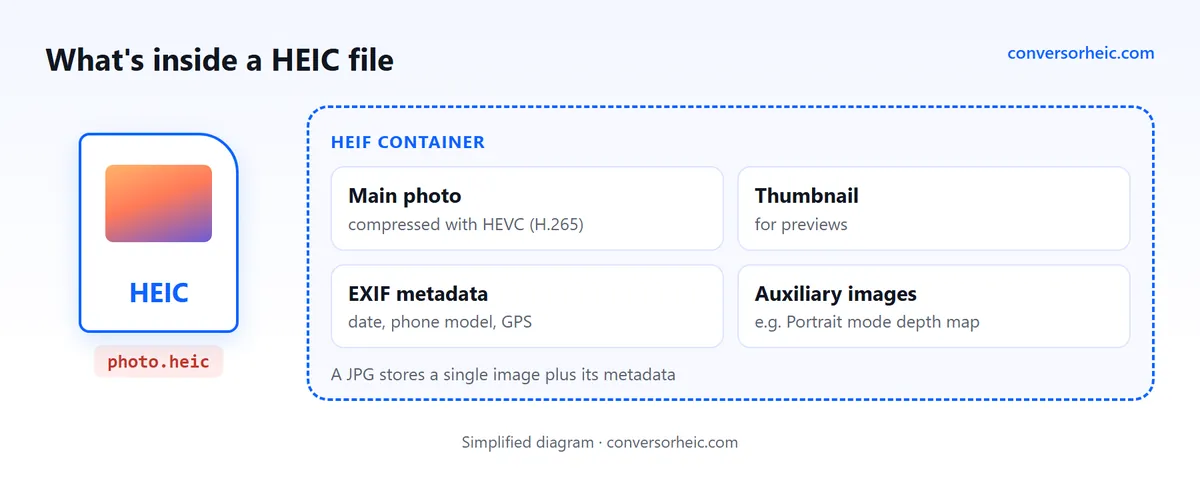
Unlike a JPG, which holds a single image, a HEIC file is a container. It can hold:
- The main photo, compressed with HEVC.
- A thumbnail for previews.
- EXIF metadata: the date, the phone model and, if it was turned on, the GPS location where the photo was taken.
- Auxiliary images, such as the depth map that lets you change the background blur on a Portrait mode photo.
Is HEIC a RAW format?
No, although some sites describe it that way. HEIC is a compressed format, just like JPG, and the phone has already processed the photo by the time it's saved. The iPhone's RAW option is called ProRAW. It's only on Pro models (from the iPhone 12 Pro onwards) and it produces much larger files.
Why your iPhone or Samsung saves photos as HEIC
To save space. Apple switched the default from JPG to HEIC with iOS 11 in 2017. According to Apple, HEIC compresses better than JPEG and uses less storage at the same visual quality. I compare the two in detail in HEIC vs JPG file size.
On Android it isn't usually the default, but Android 10 added support for taking photos in HEIC and many Samsung Galaxy phones offer it through the High efficiency pictures setting. If that's on, your photos are .heic too. Samsung HEIF photos explains how to turn it off.
Where HEIC files open, and where they don't
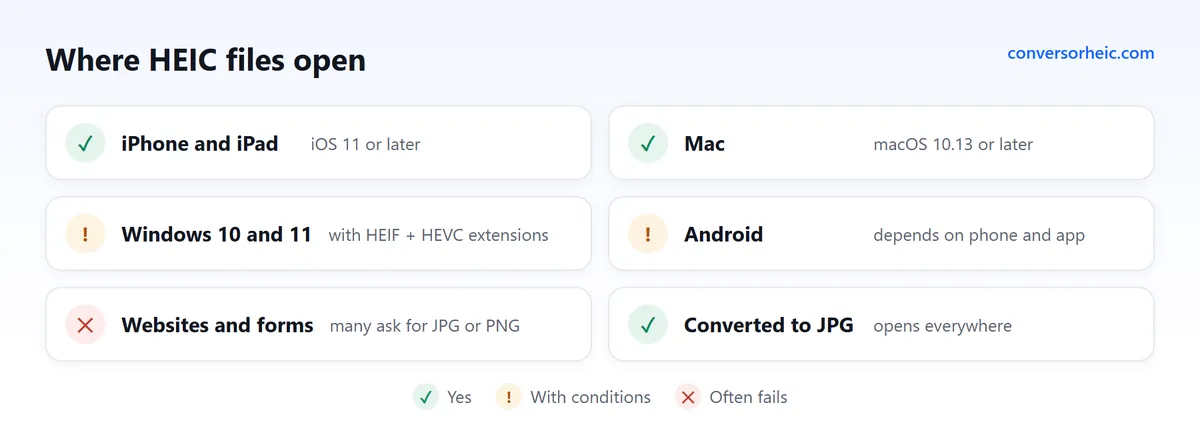
| Where | Does it open? |
|---|---|
| iPhone and iPad (iOS 11 or later) | Yes, nothing to install |
| Mac (macOS High Sierra 10.13 or later) | Yes, in Photos or Preview |
| Windows 10 and 11 | Only with Microsoft's HEIF and HEVC extensions |
| Android | Depends on the phone and the gallery app |
| Websites, forms and photo printing services | Many don't accept it: they ask for JPG or PNG |
| Sent as a photo it's recompressed; sent as a document the original .heic arrives |
This part catches a lot of people out. When you copy photos from an iPhone to a PC over a cable, the iPhone may convert them to JPG on its own, which is why you sometimes get one format and sometimes the other. To always get the originals, turn on Settings > Apps > Photos > Keep Originals. AirDrop, Messages and email behave in a similar way: if the other device doesn't support HEIF, the photo may arrive in a more compatible format.
How to open a HEIC file
- On Windows: install the HEIF and HEVC extensions from the Microsoft Store. Step by step in how to open HEIC files on Windows 11.
- In Photoshop: on Windows it needs those same extensions. Details in how to open HEIC in Photoshop.
- If it came through WhatsApp and doesn't show in your gallery, read HEIC photos on WhatsApp.
- On any device, with nothing to install: convert it to JPG in your browser. All the options are in how to open HEIC files.
How to convert a HEIC file to JPG
It's the quickest fix when you need a photo to open anywhere:
- Open the HEIC to JPG converter in your phone or computer browser.
- Pick your .heic photos. You can add lots of them at once.
- Download the JPGs one by one or all together as a ZIP.
The conversion happens on your own device, and your photos are never uploaded to a server. Converting also strips the EXIF metadata, including the GPS location. For other ways to do it (on iPhone, Mac or Windows), see how to convert HEIC to JPG on any device.
Convert it to JPG in seconds, free and without uploading it anywhere.
Convert HEIC to JPG
Should you keep HEIC or switch to JPG?
If you'd rather your iPhone took photos as JPG, the setting is in Settings > Camera > Formats > Most Compatible. It only affects new photos; the step by step is in how to convert HEIC to JPG. Before you change it, think about how you use your photos:
| Your situation | Best choice |
|---|---|
| You're short on space and your photos stay on the phone or in iCloud | Keep HEIC |
| You often copy photos to a Windows PC | Most Compatible (JPG) |
| You upload photos to websites, forms or printing services | Most Compatible (JPG) |
| You only share outside the iPhone now and then | Keep HEIC and convert just those photos |
Frequently asked questions
What is a HEIC file?
It's a photo saved in the HEIF format and compressed with HEVC. It's the iPhone's default photo format since iOS 11 and takes up less space than a JPG of similar quality, but not every device or website can open it.
Are HEIC and HEIF the same thing?
Almost. HEIF is the standard format and HEIC is its version with HEVC compression, the one Apple uses. In practice they open and convert with the same apps.
Is HEIC better quality than JPG?
At the same file size, yes: it compresses better, so it keeps more detail in less space. At the same visible quality, HEIC's advantage is that it takes up much less space.
Why can't I open a HEIC file on Windows?
Because Windows doesn't include support out of the box. You need to install Microsoft's HEIF and HEVC extensions from the Microsoft Store, or convert the file to JPG.
What file extensions do HEIF files use?
The most common is .heic, the one the iPhone uses. There's also .heif and, on some cameras such as Canon's, .hif. They all open and convert with the same apps.
Is a HEIC file a RAW format?
No. It's a compressed format, like JPG. The iPhone's RAW format is ProRAW, available only on Pro models from the iPhone 12 Pro onwards.
Sources
- Apple: Using HEIF or HEVC media on Apple devices.
- Android Open Source Project: HEIF imaging (HEIC capture support from Android 10).
- Wikipedia: High Efficiency Image File Format.
- Cover photo: Jana Al Mubaslat on Pexels (Pexels license).
← Back to the blog · How to convert HEIC to JPG on any device